

TIPThis article is republished with authorization from a Fluid user. All rights reserved to the original author.
Author: Tokisaki_Galaxy Original: https://tski.uk/background-tryment-clock
WARNINGThis project is specifically optimized for the Hexo-Fluid theme; other themes may require manually modifying theme code for the best experience. Hexo-Theme-Fluid project: https://github.com/fluid-dev/hexo-theme-fluid
Preview
Project on GitHub Online preview on Hexo
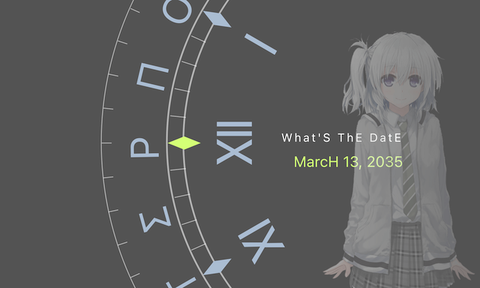
The clock recreates the slightly mysterious interface design from the game, with rotating dual rings and special symbol markers creating a unique visual experience. Whether used as a blog decoration or a personal page flourish, it adds plenty of sci-fi atmosphere.
Introduction
A web clock implementation imitating the clock interface design in the game TrymenT ―今を変えたいと願うあなたへ―. It provides a digital clock with a special visual style. I really love this game — when is RASK going to release OmegaA? Even if they split it into parts, don’t leave it unfinished! The leftmost pointer is the indicator; the pointer stays still while the inner and outer rings keep moving instead. The inner ring represents hours, the outer ring represents minutes.
Features
- Unique dual-ring clock design
- Special fonts and symbol markers
- Customizable date display format
- Responsive design, adapts to different screen sizes
- Semi-transparent background image effect
How to use
Required files

Using in Hexo
(Recommended!) Hexo injection
Hexo injector is a feature introduced after Hexo 5.
To write the injection code, create a scripts folder in the root of your blog, then create a js file with any name inside it.
For example, create /blog/scripts/Tryment-Clock.js with the following content:
hexo.extend.injector.register('body_begin', '<link rel="stylesheet" href="https://cdn.jsdelivr.net/gh/Tokisaki-Galaxy/TrymenT-ClocK/TrymenT-ClocK.min.css"><script type="text/javascript" src="https://cdn.jsdelivr.net/gh/Tokisaki-Galaxy/TrymenT-ClocK/TrymenT-ClocK.min.js"></script>', 'default');(More troublesome) Modifying theme code
Put the following code into the layout/layout.ejs file of the theme, then copy the corresponding files into the css, js, and img folders.
<% if (theme.background_trymentclock.enable) { %> <!--下面两行是核心内容--> <%- css_ex(theme.static_prefix.internal_css, 'TrymenT-ClocK.min.css') %> <%- js_ex(theme.static_prefix.internal_js, 'TrymenT-ClocK.min.js') %> <% } %># 背景的TrymenT时钟特效,如果需要切换背景图片请在主题目录下替换 /source/img/img.png# See: https://github.com/Tokisaki-Galaxy/TrymenT-ClocKbackground_trymentclock: enable: falseUsing as a standalone page
<!DOCTYPE html><html lang="en"><head> <meta charset="UTF-8"> <meta name="viewport" content="width=device-width, initial-scale=1.0"> <title>TrymenT ClocK</title> <link rel="stylesheet" href="https://cdn.jsdelivr.net/gh/Tokisaki-Galaxy/TrymenT-ClocK/TrymenT-ClocK.min.css"> <script type="text/javascript" src="https://cdn.jsdelivr.net/gh/Tokisaki-Galaxy/TrymenT-ClocK/TrymenT-ClocK.min.js"></script></head></html>Notes
- The clock effect may consume some system resources and can be slightly laggy on low-end devices
- The background image is semi-transparent by default, which may conflict with some dark themes
- On mobile devices, the clock automatically resizes to fit the screen
- If you want to change the background image, it’s recommended to keep the dimensions above 1920×1080
- It’s not recommended to add multiple clock instances on a page, as this may cause performance issues