

Log into the optical modem admin page
The admin address of a China Mobile optical modem is usually 192.168.1.1. The regular username and password are printed on the bottom of the modem box (though that account is basically useless).
Super admin account: CMCCAdmin, password aDm8H%MdA.
The super admin has more privileges than a regular user and can configure more settings.
(China Mobile is dumb enough to set the same super admin account and password nationwide lol)
Set up bridging
Log in with the super admin, and click the green “网” (Network) section at the top.
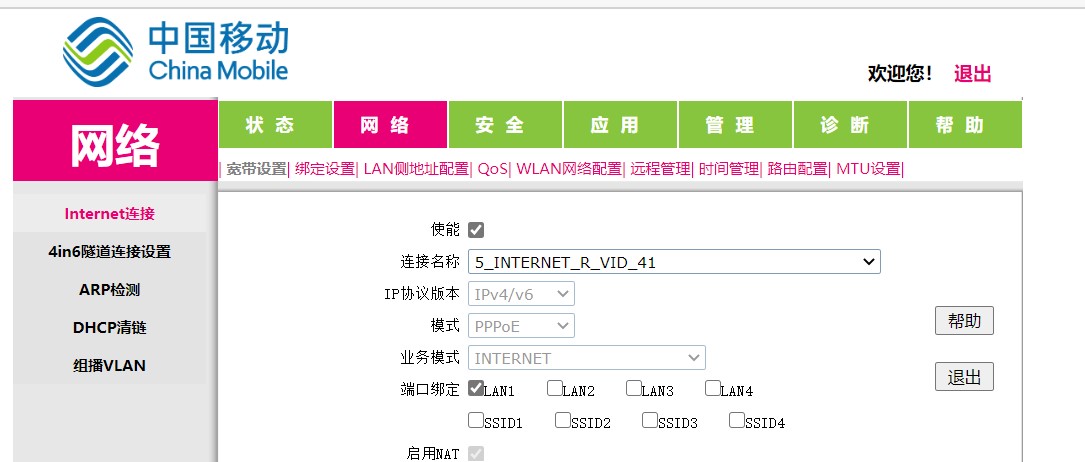
Click on the connection name, then click “New” in the dropdown menu on the right. Create a new one, select LAN3 as the port, and switch it to bridge mode. Then physically unplug the network cable from LAN1 and plug it into LAN3. PS: Why do I use LAN3 instead of just modifying LAN1? Because if I mess it up, I can always switch it back.
Router settings
Switch to PPPoE dial-up, enter the account and password, and you’re done.
If you don’t know the broadband password (like me, you can send the text message CZKDMM from the phone number registered for the account to 10086, and it will reset a new random password for you).
IPTV
Originally, China Mobile’s IPTV was connected to the optical modem via an Ethernet cable. I wanted to move the IPTV box into the room but was too lazy to pull such a long cable, so I used a wireless connection.
Log into the optical modem admin page with the super admin account. On the same interface where you set up bridging, find the 6_OTHER_B_VID_48 entry. Only LAN2 should be checked in the port binding; check SSID1 below it, and you can connect the IPTV wirelessly.